
GEO for WordPress: How to Make Your Site AI-Ready (Step by Step)
GEO Academy · Module 3 — GEO on WordPress · Updated August 2026 · by Octoplug
To do GEO on WordPress, prepare your site so generative engines like ChatGPT, Perplexity and Google AI Overviews can find, understand and quote it: publish an llms.txt, add JSON-LD schema, write answer-first content, control which AI crawlers reach you, keep it fresh, and then measure whether it’s working. You can do each step by hand, or run them from one plugin. This is the practical, WordPress-specific playbook — not the theory.
On this page9 sections
This guide walks through exactly what “AI-ready” means for a WordPress site, the six things that actually move the needle, how to do them (manually and the fast way), whether you need a plugin or a SaaS platform, and how far up the Free → Pro → Elite path you should realistically go. No fluff, no guaranteed-citation promises.
- The best way to check if your WordPress site is AI-ready (free) — coming soon
- GEO plugin vs GEO SaaS: which one does a WordPress site actually need? — coming soon
- One plugin instead of four: what a GEO “Suite” replaces — coming soon
- Fix your GEO score in an afternoon: a hands-on walkthrough — coming soon
What does “AI-ready” mean for a WordPress site?
An AI-ready WordPress site is one a generative engine can parse, trust and quote without guessing. That means your identity is declared, your content is structured and readable by machines, your key pages are mapped in a format LLMs handle, the right AI crawlers are allowed in, and your information stays current. It’s the same intent as SEO — being found — but aimed at answer engines instead of the classic search results page.
WordPress makes some of this easy and some of it awkward. Easy: you already have structured content, categories and a clean permalink system. Awkward: WordPress doesn’t serve a static file at your domain root by default, its default schema is thin, and nothing tells you where you stand with AI engines. GEO on WordPress is mostly about closing those gaps — deliberately, in the right order.
How do you do GEO on WordPress, step by step?
There are six moves, and they map one-to-one onto how AI reads a site: (1) make your site recognizable, (2) make your content readable by machines, (3) add structured data, (4) control AI crawler access, (5) keep it fresh and trustworthy, and (6) measure whether AI actually reads and cites you. Do them in this order — recognition and readability first, measurement last — and you cover everything that matters without wasted effort.
These six are also the six pillars our free GEO Score grades, so if you’d rather see your gaps scored automatically before reading on, that’s the shortcut. But the manual logic is worth understanding either way.
Step 1 — Make your site recognizable
Start by telling AI who you are and what your site is about, unambiguously. That means a clear site name and description, a logo AI can associate with your brand, consistent identity signals across pages, and an llms.txt file at your root that summarises your site and points to your best content. Recognition is the foundation: an engine that can’t tell what your site is won’t confidently cite it.
The single highest-leverage action here is publishing llms.txt (and, for content-heavy sites, llms-full.txt). It’s a Markdown file at yoursite.com/llms.txt that hands AI a curated map of your site instead of forcing it to crawl and infer. On standard WordPress you can’t just drop a file in a folder and have the root URL serve it cleanly — you’ll need FTP or a rewrite rule by hand, or a plugin that serves and caches it for you.
Step 2 — Write content AI can read and quote
AI engines quote content that answers a question directly, in plain language, near the top. Lead each page or section with a concise, self-contained answer (roughly 40–80 words), use a logical heading structure, phrase headings as the questions people actually ask, and add descriptive alt text and clear internal links. “Answer-first” isn’t a style preference — it’s the format models lift into their responses. This very article is written that way on purpose.
Practical WordPress checklist: one <h1> per page, <h2>s that read as real questions, short paragraphs, real lists and tables where they help, and a factual first sentence under every heading. Avoid burying the answer under three paragraphs of preamble — a model (and an impatient human) may never reach it.
Step 3 — Add structured data (JSON-LD schema)
Structured data spells out, in machine-readable JSON-LD, what your pages are — an organisation, an article, an FAQ, a breadcrumb trail — so AI doesn’t have to infer it from your HTML. At minimum a WordPress site wants Organization and WebSite schema (identity), Article schema on posts, Breadcrumb for structure, and FAQPage where you answer questions. Clean schema is one of the strongest “who and what” signals you can send.
You can hand-code JSON-LD, but on WordPress it’s fragile: it has to stay in sync with your content, and a syntax slip silently breaks the whole block. This is where automation earns its place — schema generated from your actual content, updated when the content changes. Importantly, GEO schema runs alongside Yoast, RankMath or AIOSEO, not instead of them — they handle classic SEO markup; GEO adds the AI-facing layer.
Step 4 — Control which AI crawlers reach your site
You decide which generative engines are allowed to read your content, using directives in robots.txt for bots like GPTBot, PerplexityBot, Google-Extended and others. Allowing the crawlers you want is what makes Steps 1–3 pay off — an engine you block can’t cite you; an engine you allow can now understand you, because you’ve prepared the ground. This is control (allow/block), and it’s the front door to everything else.
On WordPress you can edit robots.txt by hand, but the rules are easy to get subtly wrong, and a good llms.txt is useless if the bot that would read it is blocked upstream. The goal is intentional access: open the door to the engines you care about, in plain, auditable rules — no external services, no data leaving your site.
Step 5 — Keep it fresh and trustworthy
Freshness and trust are ranking signals for AI just as they are for Google: current dates, maintained content, working links, and consistent identity all raise the odds an engine treats your page as a reliable source. A stale page — or a stale llms.txt pointing to content you deleted — actively misleads, and a misled engine is worse than an absent one. GEO isn’t set-and-forget; it’s a habit.
The lightweight discipline: update cornerstone content when the topic moves, keep your llms.txt in step with your live pages, and fix broken links before they rot. If your files are generated automatically they track your content for you; if they’re manual, freshness is a recurring calendar task you can’t skip.
Step 6 — Measure whether AI actually reads and cites you
The last step is measurement: are AI crawlers actually visiting, and are the engines actually citing you? This closes the loop — everything above improves your odds, and only data tells you if the odds are paying off. Honest measurement tracks which AI bots hit your site, how often your brand is mentioned or cited, and whether that’s trending up as you improve.
Here’s the honest boundary: the first five steps are free groundwork you can verify yourself, but citation and crawler measurement needs ongoing data collection — that’s the job of the Pro tier, not something a free site-level check can fully answer. It’s fine to run Steps 1–5, ship, and only add measurement once you want proof.
Can you do GEO on WordPress by hand, without a plugin?
Yes — every step above can be done manually, and for a small, rarely-changing site that may be enough. You can write llms.txt and upload it, hand-code JSON-LD, edit robots.txt, and structure content answer-first yourself. The trade-off is maintenance and blind spots: manual files go stale, hand-written schema breaks silently, and nothing tells you your score or ranks your gaps. You’re doing the work and the auditing.
The realistic middle ground for most active WordPress sites is to automate the plumbing (files, schema, crawler rules) and keep the judgement (what to write, what to prioritise) human. That’s the split a good plugin is built around: it does the tedious, error-prone, repetitive parts, and shows you where to point your attention.
How do you check your WordPress site’s AI-readiness for free?
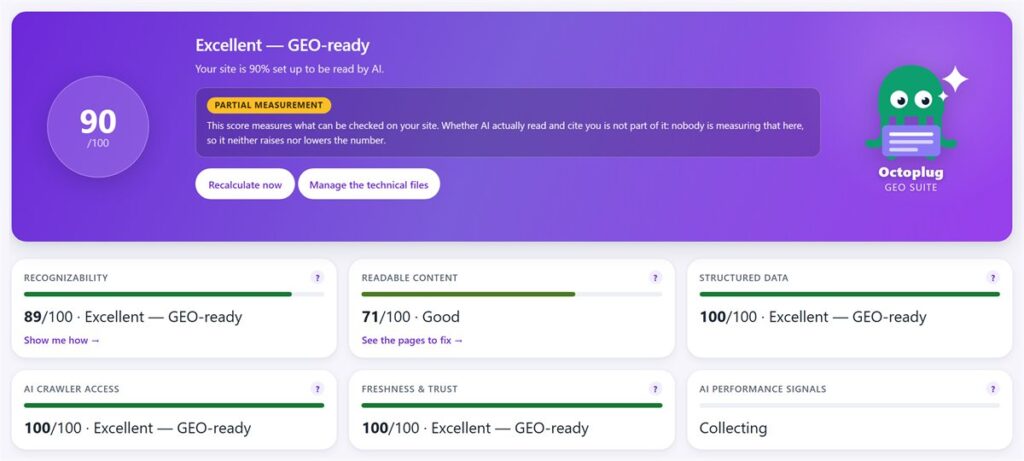
Install a plugin that grades your site against the signals above and hands you a prioritised list of fixes — or run a free readiness checker before you commit. The fastest path is our free GEO Score: a deterministic, 6-pillar score (Recognizability, Readable content, Structured data, AI crawler access, Freshness & trust, and AI performance signals) with one-click Fix actions, so you see exactly what’s missing and jump straight to correcting it.
One honest note on that sixth pillar: AI performance signals is measured from real crawler and citation data, which lives in the Pro tier — so on the free plugin the score focuses on the five you can act on directly, and the sixth fills in once you’re measuring. That’s by design: the free score tells you if your site is built right; measurement tells you if it’s working.

GEO Suite (free — direct download) checks your GEO Score, generates your llms.txt, and hands you a prioritised fix list — without ever leaving WordPress.
Do you really need four plugins, or one “Suite”?
Done the mono-tool way, GEO for WordPress can mean stacking separate plugins — one for llms.txt, one for schema, one for an audit, one for crawler rules — four things to install, update and reconcile. A “Suite” replaces that stack with a single tool where the pieces already know about each other: the score reads the schema you generate, the crawler rules line up with the files you serve, and one update covers all of it. Fewer moving parts, less drift.
That’s the reasoning behind building GEO Suite as a suite rather than a single-file generator. The free plugin covers llms.txt/llms-full.txt, a Markdown (.md) version of every page, base JSON-LD schema (Organization, WebSite, Article with a Person author node and sameAs, Breadcrumb, FAQPage), AI crawler control, a “Visible to AI” column with bulk visibility actions, and the GEO Score that ties them together — one plugin, one place.
GEO plugin vs GEO SaaS: which does a WordPress site actually need?
For a WordPress site, a plugin is usually the right starting point; a dedicated GEO SaaS platform is a heavier, pricier tool aimed at enterprise monitoring. Standalone GEO platforms (Peec, Otterly, Scrunch, Profound and similar) run monitoring across hundreds of prompts and channels — genuinely powerful — but they charge roughly $89–499 per month, live outside WordPress, and typically tell you you’re not cited without fixing anything. A plugin lives where your site does and acts on the problem.
The honest version: those SaaS platforms out-monitor any WordPress plugin on breadth of prompt tracking — that’s their turf and we don’t pretend otherwise. Where a plugin wins is access and integration: it prepares and fixes your site natively, at a fraction of the cost, for the site owners and small agencies the SaaS tools price out entirely. Most WordPress sites need the fix, not the enterprise dashboard.
Free, Pro or Elite — how far up should you go?
Start Free, and stay there until you have a specific reason to move up: upgrade to Pro when you want to measure your AI citations, and to Elite when you want the tool to do the optimisation work for you. The free plugin genuinely gets a site AI-ready; the paid tiers add measurement and automation, not the basics. Most sites get real value without paying anything.
- Free — get AI-ready. GEO Score (6 pillars, one-click Fix),
llms.txt&llms-full.txt, a Markdown version of every page, JSON-LD schema — Organization, WebSite, Article with a Person author node +sameAs(job title, bio, multiple profiles: the E-E-A-T signal most sites skip), Breadcrumb, FAQPage — AI crawler control, “Visible to AI” controls, onboarding wizard, WPML/Polylang, native EN/IT/DE/FR/ES — with zero external calls. - Pro — see if AI actually cites you. The AI Citation Counter answers “am I in the answers?” — automatic tracking with your own API keys (Perplexity, OpenAI, Gemini, Anthropic), plus a manual-paste mode (Beta) for engines without an API and for AI Overviews. Honest KPIs — Citation Share, Brand Mention Rate, Source Frequency — plus per-page analysis, AI crawler & referral monitoring, score history and before/after baseline, and advanced schema (speakable +
sameAsgap-fill). from €99/year - Elite — let the AI do the work. Generative optimisation: AI-written FAQ, answer-first summaries and schema, content auto-optimisation with preview + undo, and a “6-click” GEO Autopilot — multi-provider with credits included. from €149/year
Whatever tier you land on, the ceiling is the same and we’ll say it plainly: no plugin — ours included — can guarantee an AI will cite you. What it can do is remove every technical reason an engine might skip, misread or distrust your content, and then measure whether it’s working. That’s a real, achievable goal.
A realistic GEO workflow you can start this week
You don’t need a project plan — you need an afternoon. Install the free plugin, run the onboarding wizard, and look at your GEO Score. Work top-down through the Fix actions: generate your llms.txt, add the base schema, set your crawler rules, and tidy your highest-traffic pages to be answer-first. Re-check the score, and you’ll usually see it climb the same session. Then make freshness a monthly habit, and add measurement (Pro) only when you want proof.
That’s the whole loop: prepare → fix → keep fresh → (optionally) measure. Nothing here is exotic, and none of it requires you to become a GEO expert — which is precisely the point.
Frequently asked questions
What is GEO for WordPress?
GEO (Generative Engine Optimization) for WordPress means preparing your site so AI search engines — ChatGPT, Perplexity, Gemini, Google AI Overviews — can find, understand and cite it. In practice that's publishing llms.txt, adding JSON-LD schema, writing answer-first content, controlling AI crawler access, and keeping it fresh. It's the AI-search counterpart to classic SEO.
Is there an AI SEO plugin for WordPress?
Yes. GEO Suite is a free WordPress plugin that scores your AI-readiness across six pillars and gives one-click fixes: it generates llms.txt/llms-full.txt, adds base JSON-LD schema, controls AI crawlers, and serves a Markdown version of each page. Paid tiers add citation measurement (Pro) and generative optimisation (Elite).
Does GEO replace my SEO plugin (Yoast, RankMath)?
No — it complements it. Your SEO plugin optimises for classic Google search; GEO tools optimise for AI/answer engines. They run side by side without conflict. Keep Yoast or RankMath for traditional SEO and add a GEO layer for AI search.
Can I do GEO on WordPress for free?
Yes. The groundwork — llms.txt, base schema, answer-first content, crawler control, freshness — can all be done for free, by hand or with a free plugin. Only ongoing measurement (are AI engines actually citing you?) sits behind a paid tier, because it needs continuous data collection.
Will GEO get my site cited by ChatGPT?
It improves your odds by removing the technical reasons an engine might skip or misread you — but no plugin, tool or SaaS can guarantee a citation. AI engines weigh many signals you don't control. Pair solid GEO groundwork with genuinely useful, well-structured content for the best chance.
How long does it take to make a WordPress site AI-ready?
The core setup — running a readiness check, generating llms.txt, adding schema, setting crawler rules, and tidying your top pages — typically takes an afternoon with a plugin. Freshness is then a light, ongoing habit rather than a one-off task.
Free plugin
See where your site stands with AI search — free
GEO Suite scores your site across the six GEO pillars, generates your llms.txt and JSON-LD schema, and shows you what to fix first.
Score your site across the six GEO pillars, generate your llms.txt and JSON-LD, and see what to fix first.
Download free →