
llms.txt for WordPress: The Complete Guide (What It Is & How to Add It)
GEO Academy · Module 4 — Feeding the Crawlers · Updated August 2026 · by Octoplug
llms.txt is a plain-text file you place at the root of your website (yoursite.com/llms.txt) that tells AI models like ChatGPT, Perplexity and Gemini what your site is about and where your most important content lives. Think of it as a curated map for AI: instead of forcing a language model to crawl and guess, you hand it a clean, structured summary. On WordPress you can add it by hand, or generate it and keep it current automatically with a plugin.
On this page10 sections
This guide covers what llms.txt actually is, why it matters now that people ask AI instead of searching Google, how it differs from robots.txt and sitemap.xml, what a good file looks like, and exactly how to add and validate one on WordPress — the manual way and the fast way.
- llms.txt vs robots.txt vs sitemap.xml: how AI crawlers read your site — coming soon
- llms.txt vs llms-full.txt: which one you actually need — coming soon
- How to check if your llms.txt is working (and validate it) — coming soon
- 5 llms.txt mistakes that keep AI from reading your content — coming soon
- One plugin instead of four: what a GEO “Suite” replaces — coming soon
What is llms.txt?
llms.txt is a Markdown-formatted text file, published at your domain root, that gives large language models a concise, human-curated overview of your website. It lists what your site does, links to your key pages, and can point to fuller content. It was proposed in 2024 as a convention — not an official web standard — to help AI systems parse a site efficiently, the way robots.txt guides crawlers and sitemap.xml guides search engines.
The format is deliberately simple, and Markdown means both humans and machines can read it: an H1 with your site name, a short blockquote summary, then sections of links with brief descriptions. No code, no special server configuration — just a text file that answers the question “what is this site, and what should an AI read first?”
Why does llms.txt matter for AI search (GEO)?
It matters because generative engines don’t read your site the way Google’s crawler does — a clean llms.txt reduces ambiguity by declaring your best content in a format LLMs handle natively. When someone asks ChatGPT or Perplexity a question, the model pulls from content it can quickly find, parse and trust. A good file improves the odds your pages are understood, and cited, instead of skipped or misread.
This is the core of Generative Engine Optimization (GEO), sometimes called Answer Engine Optimization (AEO): preparing a site to be found and cited by AI search, not just ranked in classic results. As behaviour shifts — people don’t search anymore, they ask — llms.txt is one of the simplest, lowest-effort signals you can add today. It won’t do the whole job, but it’s a sensible first move.
Is llms.txt the same as robots.txt or sitemap.xml?
No. They solve different problems for different readers. robots.txt tells crawlers what they’re allowed to access. sitemap.xml lists every URL for search-engine indexing. llms.txt does neither — it gives AI models a curated, human-readable summary of what matters most, in Markdown. It’s about comprehension and prioritisation, not permission or exhaustive listing.
| File | Reader | Job | Format |
|---|---|---|---|
robots.txt |
Crawlers / bots | What may be accessed | Directives |
sitemap.xml |
Search engines | Full list of URLs to index | XML |
llms.txt |
AI language models | Curated summary of key content | Markdown |
You want all three: they don’t compete, they layer. robots.txt still controls which AI crawlers (GPTBot, PerplexityBot, Google-Extended and others) may access your site at all; llms.txt then helps the ones you allow understand it.
What’s the difference between llms.txt and llms-full.txt?
llms.txt is the short index; llms-full.txt is the full text. llms.txt lists your key pages with brief descriptions — a lightweight map an AI reads first. llms-full.txt bundles the actual content of those pages into one file, so a model can ingest your material in a single request without crawling page by page. Use both: the index for orientation, the full file for depth.
Which one you need depends on your site. A small business site or portfolio is served well by llms.txt alone. A documentation site, knowledge base or content-heavy blog benefits from llms-full.txt, because the value is in the body text, not just the URLs. Generating both is best practice — and, done right, it’s automatic.
What does a good llms.txt look like?
A good llms.txt is short, well-structured and honest: it opens with your site name as an H1, a one-line summary in a blockquote, then grouped links with a few words of context each. It highlights your best content, not everything. Clarity beats completeness — the file exists to help a model prioritise, so a bloated, unfocused llms.txt defeats its own purpose.
The pattern is always the same: identity first, a crisp summary, then priority links grouped into a handful of sections (core pages, guides, optional), each with a short description that tells the model why the page matters. That description text is doing real work — it’s the difference between an AI understanding your site and guessing at it.
How do you add llms.txt to WordPress?
You have two options: create the file manually, or generate it with a plugin. Manual gives full control but has to be maintained by hand every time your content changes. A plugin generates the file from your existing pages, keeps it updated automatically, and serves it at the correct root URL — which matters, because WordPress doesn’t put a static file at the domain root by default.
Option 1 — Create llms.txt manually
Write the file in Markdown following the structure above, then make it reachable at yoursite.com/llms.txt. On a standard WordPress install you can’t just drop a file into a folder and expect the root URL to serve it cleanly, so most manual setups either upload the file to the web root via FTP/SFTP, or add a rewrite rule so WordPress serves it from that URL. The catch: your content changes, and a static file doesn’t. For a site that rarely changes, manual is fine; for an active site it goes stale fast — and a stale llms.txt is worse than none, because it misleads.
Option 2 — Generate it with a plugin (recommended for most sites)
A dedicated plugin reads your published content, builds a properly formatted llms.txt (and llms-full.txt), serves them at the right URLs, and refreshes them as your site changes — no FTP, no rewrite rules, no manual upkeep. That’s the whole point of a tool: the file stays correct without you thinking about it. But the honest part is that generating the file is the easy 20% — llms.txt alone is rarely enough to actually get cited, which is why a suite beats a single-file generator.

GEO Suite (free — direct download) generates and maintains your llms.txt and llms-full.txt automatically, and scores the rest of your AI-readiness — without ever leaving WordPress.
How do you check if your llms.txt is working?
Open yoursite.com/llms.txt in a browser: you should see clean Markdown text, served as plain text with a 200 response — not a 404, a redirect, or your theme’s HTML wrapped around it. If it’s wrapped or missing, AI models won’t read it as intended. Then confirm the links inside resolve and the descriptions match your current content.
A quick validation checklist:
- Reachable at the root — exactly
/llms.txt, not/blog/llms.txtor behind a redirect. - Right content type — plain text, not an HTML page.
- Valid Markdown — H1 present, links well-formed, no broken syntax.
- Live links — every URL returns 200, none point to deleted pages.
- Accurate summary — the description reflects what your site actually says today.
You can check these by eye, or use a checker that does it for you and flags what’s off.
Does llms.txt guarantee ChatGPT will cite you?
No — and be sceptical of anyone who says otherwise. No file, plugin or SaaS can guarantee an AI will cite your site. Engines decide what to surface based on many signals: content quality, authority, structure, freshness and their own opaque ranking. What llms.txt does is remove friction — it makes your site easier for a model to find, parse and understand correctly, which improves your odds. That’s the honest ceiling, and it’s still worth having.
Adoption is also uneven: not every AI engine reads llms.txt yet, and support is evolving. Treat it as a low-cost, forward-looking signal — cheap to add, sensible to have as the convention spreads — not a magic switch. The sites that actually get cited pair llms.txt with strong, answer-first content and proper schema.
llms.txt is one signal — here’s the bigger picture
llms.txt is a great first step, but on its own it rarely moves the needle. Getting found and cited by AI depends on a stack of signals working together: a clean llms.txt, structured JSON-LD schema so machines understand who you are, answer-first content AI can quote directly, and control over which AI crawlers reach your site in the first place. Skip those and a perfect llms.txt is a map to a house with no address.
This is exactly why GEO Suite is a suite rather than a single-file generator. The free plugin gives you:
- A GEO Score — a deterministic, 6-pillar readiness score with one-click “Fix” actions, so you know what’s missing and how to fix it.
- llms.txt & llms-full.txt — generated, served and kept current automatically.
- A Markdown (
.md) version of every page — the clean copy AI and agents read, at the same address with.mdon the end. - JSON-LD schema — Organization, WebSite, Article with a Person author node and
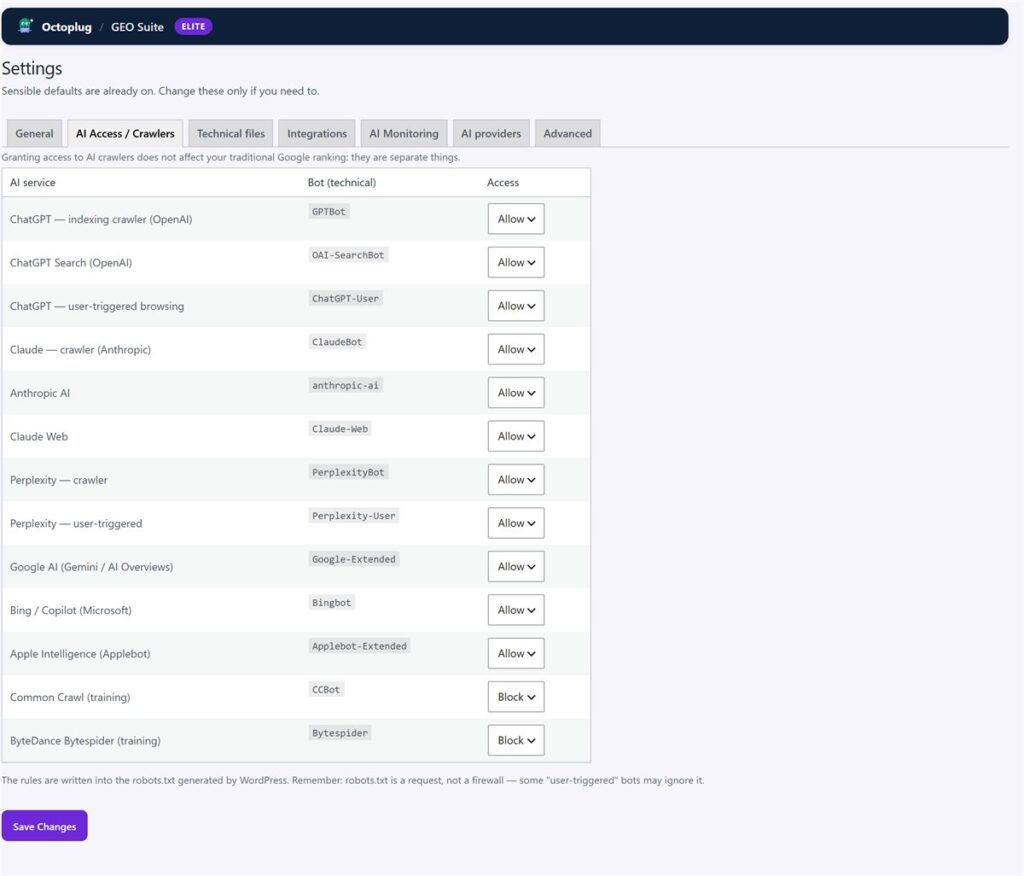
sameAs, Breadcrumb and FAQPage — running alongside Yoast or RankMath, not instead of them. - AI crawler control — decide which AI bots may read your site, with the rules written into
robots.txt, no external calls.
Generating the file is one line of the score. Seeing the whole picture — and fixing it — is the point.
Frequently asked questions
Is llms.txt required?
No. It's an emerging convention, not a requirement or an official web standard. Your site works fine without it. It's an optional, low-effort signal that helps AI models understand your content, and it's worth adding as adoption grows across engines.
Where does the llms.txt file go?
At the root of your domain: yoursite.com/llms.txt. It must be reachable at that exact URL and served as plain text, not wrapped in your theme's HTML. A plugin handles this placement automatically on WordPress.
Do I need both llms.txt and llms-full.txt?
Not always. llms.txt (the short index) suits most small sites. Add llms-full.txt (the full content bundle) if your value is in body text — docs, knowledge bases, content-heavy blogs. Generating both is best practice and, with a plugin, automatic.
Does llms.txt help SEO?
Not classic Google SEO directly — it's aimed at AI/generative engines, not the traditional index. It complements your SEO plugin (Yoast, RankMath, AIOSEO) rather than replacing it. Think of it as SEO's counterpart for AI search: same goal, different reader.
Can I add llms.txt without a plugin?
Yes — write the Markdown by hand and serve it at your root via FTP or a rewrite rule. The trade-off is maintenance: you update it manually every time your content changes. A plugin keeps it current automatically, which is why most active sites use one.
Will llms.txt get me cited by ChatGPT?
It improves your chances by making your site easier to parse and understand, but no one can guarantee a citation. AI engines weigh many signals. Pair llms.txt with strong content, schema and answer-first structure for the best odds.
Free plugin
See where your site stands with AI search — free
GEO Suite scores your site across the six GEO pillars, generates your llms.txt and JSON-LD schema, and shows you what to fix first.
Score your site across the six GEO pillars, generate your llms.txt and JSON-LD, and see what to fix first.
Download free →